Best Hospital Management System for Multi-Speciality Hospitals in India
Unify OPD consultation queues, ICU nursing flowsheets, OT surgery rosters, blood bank inventories, and cashless NHCX claims into one cloud database. Cliniqwise is a flat-rate hospital management software for multi-speciality hospitals with 50 or more beds.
Most multi-speciality hospitals experience revenue loss because legacy systems cannot organize departmental workflows: managing multiple doctor schedules, ward billing, inter-departmental transfers, and corporate insurance claims. Cliniqwise implementation takes 1-2 weeks, with a phased approach to prevent system disruptions.
Cliniqwise is built around how Indian multi-speciality hospitals actually work, with ABDM and NHCX insurance claims included, for a predictable flat yearly fee.
Quick Answer: How to Choose a Multi-Speciality HMS
For a 50+ bed multi-speciality hospital in India, your software must check these three boxes:
- •Covers all departments: OPD schedules, bed transfers, OT slots, central pharmacy stock, and lab report tracking on one database.
- •India-ready compliance: ABHA creation & health locker sync (ABDM), direct digital cashless insurance (NHCX), NABH guidelines, and secure data handling (DPDP Act).
- •Clear cost mapping: Predictable pricing models that include support, data transfers, barcode printers, and clinician training.
Comparing Architecture Approaches:
Why Multi-Speciality Facilities Require Departmental Workflow Automation
Running a multi-speciality hospital is much more complex than managing a single OPD clinic. Multiple departments share resources, bed availability changes hourly, and billing requires sync between doctors, labs, and ward charges.
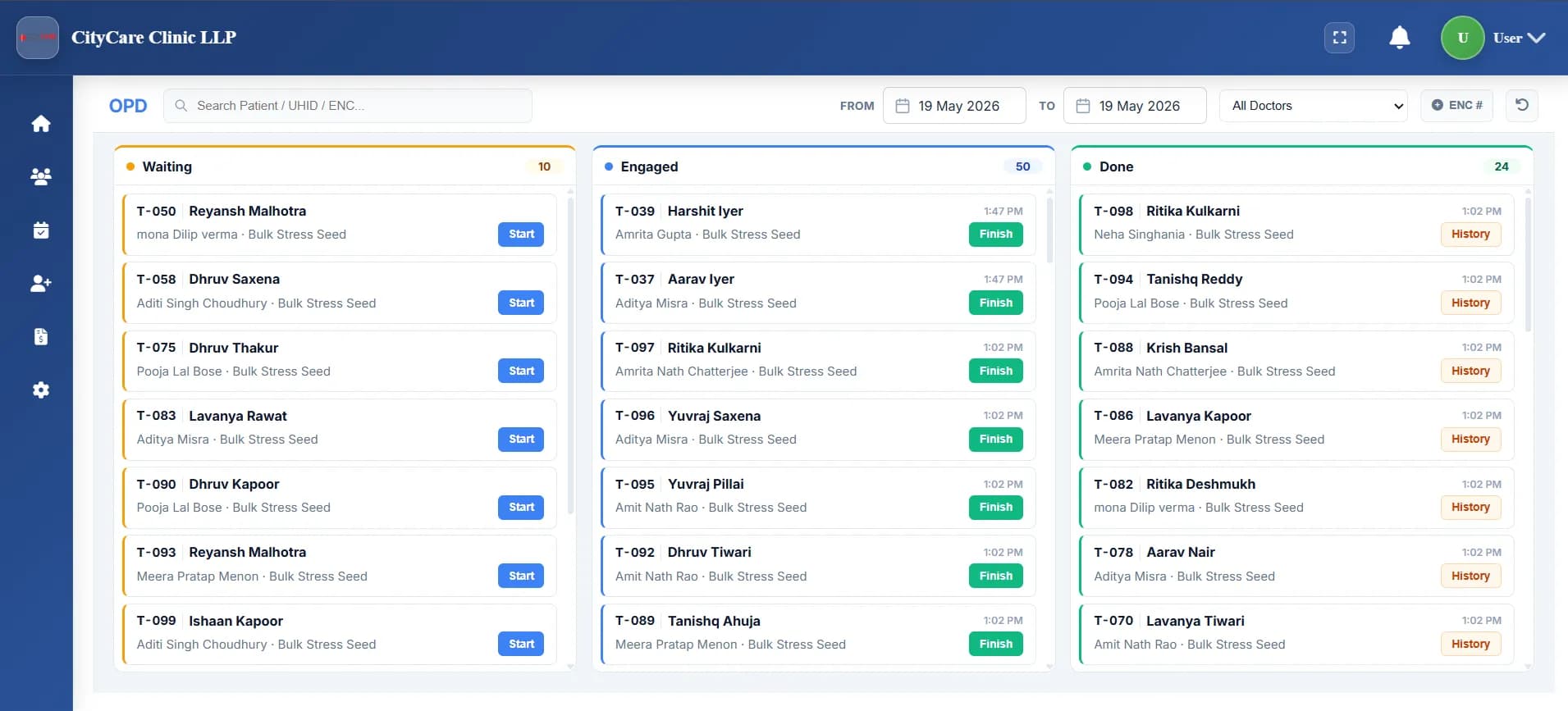
OPD Management & Specialty templates
Organizes appointment lists across Orthopedics, Pediatrics, Gynecology, and Surgery, using ICD-10 templates, SNOMED CT diagnosis search, and patient routing.
Core Needs: 10-second patient onboarding, queue displays, emergency walk-ins, and secure EMR sharing.
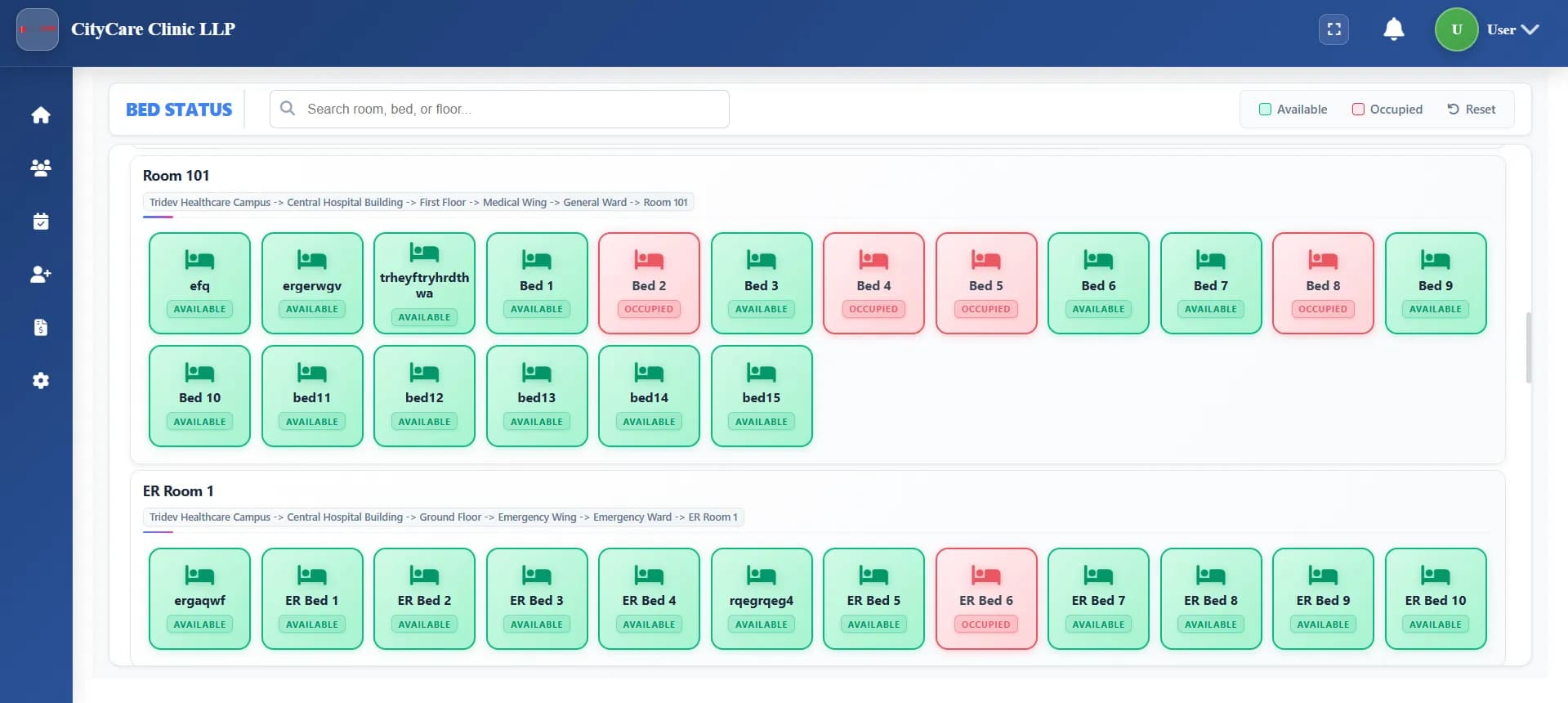
Ward ADT & Bed Occupancy Maps
Tracks occupied beds, active patient admissions, and ward transfers across ICUs and private rooms in real time.
Core Needs: Live interactive bed map showing who is occupied, pending discharge, or transferring.
OT Roster & Medication Administration (MAR)
Schedules surgeries across Operation Theatres, assigning surgeon schedules and logging post-op clinical notes and nursing MAR logs.
Core Needs: Surgical templates, anesthesia logs, and automatic transfer of drug usage to ward billing.
PACS / DICOM and Lab Analyzer Sync
Syncs pharmacy stock updates, lab machine data (Mindray, Erba), and HL7 FHIR compatible PACS/DICOM imaging scans.
Core Needs: Direct machine sync to save staff time, automated lab reports, and claim prep using NHCX.
Niche Modules Built for Complex Clinical Departments (ICU, Blood Bank, Oncology, Dialysis)
Beyond standard patient administration, Cliniqwise offers specialized modules for complex clinical sub-units.
ICU & Critical Care Workflows
Log patient vitals hourly, track ventilator air-mix, monitor fluid intake/output sheets, and trigger automatic ward nurse alerts for critical status changes.
Blood Bank & Donor Registry
Manage donor registration lists, track blood bag testing reports, trace cross-match results, and configure inventory depletion notifications.
Oncology Chemo Templates
Calculate chemo drug doses using automatic BSA (Body Surface Area) equations, log chemotherapy cycles, and track patient tumor staging history.
Dialysis Session Tracking
Record dialyzer reuse cycles, track pre- and post-dialysis patient weights, log hourly machine parameters, and sync charges directly with patient billing.
NHCX TPA Cashless Pre-Auth
Package clinical files into standard claim forms, scan for ICD-10 errors, submit to the NHCX gateway, and track claim status from TPAs in real time.
Enterprise Trust & Compliance Fortress
Cliniqwise is engineered to comply with the most stringent medical regulations, data privacy laws, and insurance standards in India.
ABDM Certified (M1, M2, M3)
Officially certified under the Ayushman Bharat Digital Mission (ABDM) and listed with the National Health Authority (NHA).
- ✓M1 Milestone: Instantly create patient ABHA numbers and link doctors with national IDs.
- ✓M2 Milestone: Safely upload outpatient Rx, laboratory files, and inpatient summaries to ABHA accounts.
- ✓M3 Milestone: Patient health records consent manager integration for sharing digital data.
NHCX Live Insurance Gateway
Fully integrated with the National Health Claims Exchange (NHCX) for unified communication with TPAs.
- ✓Auto-package medical papers into standard digital files.
- ✓Submit pre-authorizations and final discharge claims directly through the official gateway.
- ✓Real-time claim status alerts to minimize manual follow-up times.
NABH & 256-Bit Cloud Security Standards
Follows the NABH compliance framework for secure digital documentation and system logs.
- ✓Continuous change tracking (audit trails) for every single entry, edit, or delete action.
- ✓Predefined templates for doctor consultation case sheets and nurse MAR lists.
- ✓Secure data backup practices following 256-bit cloud encryption standards.
DPDP Act 2023 Compliance
Fully aligned with the Digital Personal Data Protection (DPDP) Act 2023.
- ✓Digital consent logger: track consent choices before sending WhatsApp reports.
- ✓Strict role-based authorization ensuring only assigned clinicians read case folders.
- ✓Robust data encryption in transit and at rest on secure cloud servers.
HMS Evaluation Checklist
Use these four categories to evaluate software vendors during their product demonstrations.
Clinical Usability
- • Specialty templates for different doctors?
- • Quick internal referrals between OPDs?
- • Nurse records and vitals sync?
Ease of Learning
- • Minimum clicks for writing a prescription?
- • Tablet-friendly interface?
- • Main workflows grouped on 1-2 pages?
Tech Integrations
- • Cloud server uptime guarantee and backups?
- • Direct lab machine data extraction?
- • User login security levels?
Support & Setup
- • Support through account managers or ticket queues?
- • Expected setup timeline?
- • Reference clients with similar bed counts?
Feature Priorities by Bed Size
The software requirements change based on the size and complexity of your facility.
| Bed Count | Facility Type | Priority Modules | Key Risk Factor |
|---|---|---|---|
| 50–99 beds | Single location; 2-3 OTs, general ICU. | Quick setup, main OPD/IPD bill formats, pharmacy, basic lab sync. | Overpaying for high-end features your team won't use. |
| 100–199 beds | Multi-speciality setup; active insurance caseload. | Detailed ward maps, OT schedules, LIS sync, insurance paperwork (TPA), ABDM integration. | Using multiple disconnected systems, causing manual entry errors. |
| 200–349 beds | Regional referral hospital with secondary centers. | Cloud speed, management dashboards, NHCX claims, multi-center sync, high data safety. | System lag, expensive customized update requests from vendors. |
| 350–500+ beds | Flagship group with multiple campuses. | Enterprise databases, full API integrations, custom development, strict security settings. | Complicated staff training, high software subscription costs. |
HMS Pricing Models and Hidden Costs
Standard cloud hospital systems typically charge per user or doctor. However, the base subscription quote often does not cover additional setup charges.
| Pricing Model | How It Works | Advantages | Drawbacks | Best Fit For |
|---|---|---|---|---|
| Per-user / per-doctor SaaS | Monthly charge per doctor/billing user | Low initial cost to launch | Pricing grows quickly as you hire consultants and ward staff | Outpatient clinics and small doctor networks |
| Per-module licensing | Base software fee + extra fees for LIS, OT, Pharmacy, etc. | Only pay for the modules you implement | Adding extra departments later can be expensive | Hospitals rolling out digital tools in slow phases |
| Flat subscription (hospital-wide) | One fixed subscription for the whole hospital based on beds | Predictable yearly budget, unlimited users/doctors | Slightly higher entry cost compared to basic tools | Facilities looking for flat costs and deep team adoption (Cliniqwise) |
| On-premise license | One-time license purchase + annual maintenance (AMC) | Total control of database on local hardware | Requires in-house IT staff, expensive servers, manual updates | Large groups with dedicated server rooms and strict policies |
Cost Breakdown Checklist
Make sure to budget for these operational expenses:
- • Wi-Fi & LAN setup: CAT6 cables, managed access points, and backup UPS for systems.
- • Barcode printer hardware: Sticker machines, scanners for pharmacy counters, and sample tubes.
- • Ward devices: Android tablets for nurses and consultants doing ward visits.
- • Implementation support: Transferring active patient files and training staff.
- • Compliance checks: Safety tests required to meet patient data regulations (DPDP Act).
Cliniqwise Cost Structure
To prevent unexpected price rises as you add consultants, rooms, or departments, Cliniqwise uses a **flat subscription model**.
You do not pay per doctor account, per invoice generated, or per appointment. This keeps your yearly software expenditure completely predictable.
Pricing and Cost Matrix
Ask vendors these questions to avoid hidden fees in your service agreements.
| Item | Type | Questions to Ask | Things to Avoid |
|---|---|---|---|
| Software License | Recurring Subscription | Are all modules (IPD, Pharmacy, LIS) included? Are there limits on doctor accounts? | Limits on doctor profiles or active bed updates that trigger extra fees. |
| Setup & Training | One-time | How many training days are included? Is there support during the launch week? | Extra billing for training new staff hires or retraining. |
| Hardware Sync | One-time | Is the software compatible with standard barcode printers and lab machines? | Being forced to buy specific, expensive printer brands from the vendor. |
| Data Transfer | One-time | Can you migrate our active patient list and drug stocks from our old software? | Hidden fees for data conversion or long timelines. |
| Compliance Updates | Included/Recurring | Are future changes for ABDM and NHCX included in the base price? | Paying for mandatory updates whenever government rules change. |
Cliniqwise vs Large Enterprise EHR vs Corporate Hospital ERP
A direct comparison of clinical workflows, deployment agility, and total cost of ownership.
| Details | Large Enterprise EHR | Corporate Hospital ERP | Cliniqwise (India Cloud OS) |
|---|---|---|---|
| Focus Area | Deep clinical documentation and decision support for very large institutions. | Multi-crore corporate ERP focused on deep supply chain, financial ledger, and multi-department capital assets. | Full hospital system with bed maps, touch-friendly screens, and direct doctor prescription flows. |
| Best Suited For | 500+ bed health systems with large in-house IT teams. | Large hospital conglomerates with multi-crore budgets and dedicated corporate IT administrators. | Hospitals prioritizing quick staff adoption, flat costs, and patient alerts on WhatsApp. |
| Pricing Structure | Multi-crore capital expenditure + steep per-user recurring maintenance fees. | Multi-crore licensing, 12+ month rollout cycles, and high consultant AMC rates. | Flat yearly subscription based on bed brackets. Unlimited users, doctors, and bills with zero user surcharges. |
| ABDM Compliance | Requires costly bespoke third-party middleware and custom FHIR bridging for Indian ABDM. | Requires separate custom enterprise connector projects for NHCX insurance claim exchanges. | NHA-certified ABDM M1, M2, and M3 milestones with native NHCX claims exchange & consent manager. |
| Prescription Flow | Highly granular, multi-screen US-centric charting menus requiring extensive clinician training. | ERP-centric forms; structured for billing and accounting rather than fast outpatient queues. | Simple one-screen prescription writer, designed to help doctors wrap up visits quickly. |
| WhatsApp Sync | Patient portal web links; WhatsApp features require third-party integration pipelines. | Relies on legacy email and SMS gateways; no native WhatsApp patient engagement. | Sends prescriptions, billing updates, and lab reports directly to the patient's WhatsApp. |
| Setup & Support | 12 to 24 month enterprise implementation cycle with specialized on-site consulting teams. | 12+ month rollout cycle with dedicated systems integrators. | Dedicated setup support manager with agreed SLA response times (live in 1-2 weeks). |
Key Strengths of Cliniqwise for Multi-Speciality Setups
How we help hospital owners streamline administration and keep software overhead predictable.
Predictable Subscription
A flat-rate subscription that stays the same even as you add new doctors, specialists, or billing desks.
One-Screen Clinical Note
Prescriptions, diagnostic orders, and diagnoses are entered on a single page, reducing typing work for senior consultants.
WhatsApp-First Alerts
Delivers bills, e-prescriptions, and laboratory findings straight to the patient's WhatsApp number in digital PDF format.
Ward & Bed Boards
ADT, room assignments, OT logs, and pharmacy stocks are managed through touch-screen layouts for nursing staff.
Direct Support Team
A named account manager handles your setup, updates, and compliance audits instead of anonymous chat widgets.
Launch & Staff Training Timelines
Cliniqwise setup takes 1-2 weeks, including staff training and patient list migration. For larger facilities, we recommend a phased approach.
Phase 1: Pricing & Forms (Weeks 1-3)
Configuring OPD doctor schedules, uploading drug lists, and saving standard bill settings.
Phase 2: Department Training (Weeks 4-6)
Activating front-desk billing, central pharmacy counters, and training lab techs and ward nurses.
Phase 3: Parallel Launch (Weeks 7-10)
Running the new software alongside old registers for 2-3 weeks to verify numbers before complete switchover.
Best Practices for a Smooth Launch
- 1. Phase 1 RestrictionsAvoid requesting custom program changes during Phase 1. Focus on standard features first.
- 2. Department Super-UsersPick one lead doctor, nurse, and biller to act as setup champions for their teams.
- 3. Launch Parallel TestingRun active checks between billing logs in the old and new systems during the parallel phase.
What Indian Hospital Directors Say
Feedback from hospitals and clinics that moved to Cliniqwise.
“Cliniqwise connected patient registration, clinical records and hospital operations seamlessly. ABDM M1, M2 and M3 workflows are 100% compliant and simple for our staff.”
“Directly sharing prescriptions on WhatsApp is highly convenient. Patients do not need to download separate apps, and our clinic has seen a 95% drop in billing leaks since billing integrates directly with prescriptions.”
“Very simple OPD billing and patient queue management. Our staff learned to operate it in just one afternoon.”
Frequently Asked Questions
Official Regulatory Resources & Citations
Ready to choose an HMS your team will actually adopt?
Book a detailed implementation roadmap audit for your multi-speciality hospital. Let us show you a low-click EMR workflow, ABDM-linked charts, and automated billing in action.